MiniLyrics supports embedded lyrics in MP3 and M4A files.
You could view embedded lyrics in iTunes, iPod, iPad and Windows Media Player.
- ID3v2 synchronized lyrics, ID3v2 unsynchronized lyrics and Lyrics3v2 lyrics are for MP3 files.
- M4A lyrics are for apple M4A(AAC) files.
How do I save embedded lyrics?
- Please click context menu item
- Then click 'Lyrics' -> 'Save Lyrics in Song File'.
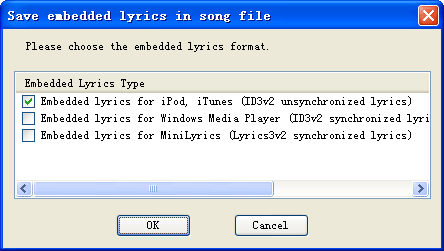
- In the popup dialog, choose the embedded lyrics format to save.
- Then click OK.
How do I load embedded lyrics?
- Please click context menu item
- Then click 'Search Lyrics'.
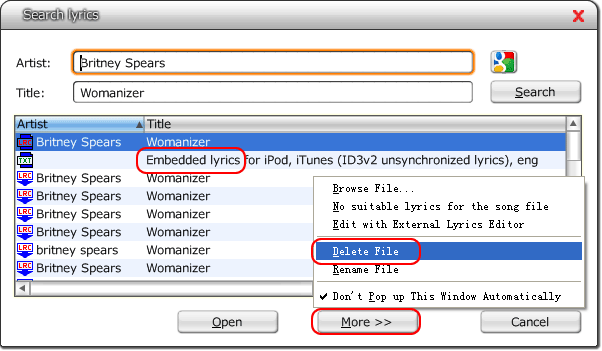
- Select Embedded lyrics for iPod, iTunes...
- In the popup dialog, then click 'More >>'. If there hasn't Embedded lyrics in list , no embedded lyrics is in the song file.
How do I remove embedded lyrics?
- Please click context menu item
- Then click 'Search Lyrics'.
- In the popup dialog, choose the embedded lyrics.
- Then click 'More >>'.
- Then click 'Delete File' menu item to delete the lyrics. If there hasn't Embedded lyrics in list , no embedded lyrics is in the song file.